Applicant History
Applicant History shows every Articleship application connected to your firm, with its current status and exactly who is holding it right now — useful when a student asks “what’s happening with my application?”
Opening Applicant History
Go to the Applications menu
In the sidebar, select Applications to expand it, then select Applicant History.
View the history table
Every application tied to your firm appears in a table, most recently assigned first.
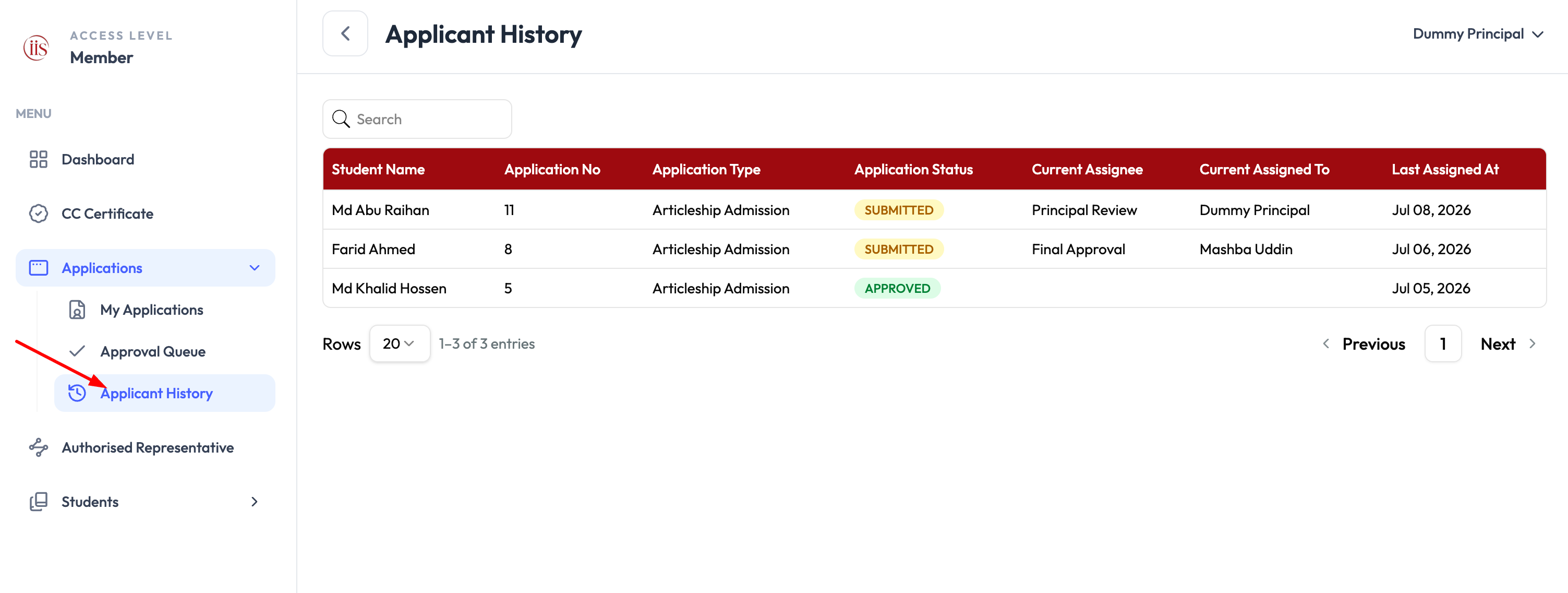
Applicant History — Sidebar: Applications → Applicant History
Reading the list
Each row shows:
- Student Name and Application No — who the application belongs to and its reference number.
- Application Type — e.g. Articleship Admission.
- Application Status — the overall state, such as Submitted or Approved.
- Current Assignee — the review stage the application is sitting at right now, e.g. Principal Review or Final Approval.
- Current Assigned To — the specific person holding it at that stage, e.g. a named principal or representative. This is blank once the application is fully Approved.
- Last Assigned At — the date it moved to its current stage.
Reading who has the ball
If a student says their application seems stuck, check Current Assignee and Current Assigned To first — that tells you exactly which reviewer needs to act next.
To act on an application still awaiting your review, see Student Approval Workflow.